
AccsZone and Social Browser: An Authorization-First Guide to Browser Profiles, Proxies, and Account Security
Editorial note (November 2026): This is an independently written practical guide following a reciprocal editorial discussion with AccsZone. It does not imply a software integration or endorse buying, selling, or transferring accounts in breach of a platform's rules. Teams must verify ownership, authorization, seller representations, and the terms of each service. Partner links are identified below.
Keeping several legitimate client or business accounts organized is an operational problem before it becomes a browser problem. People need to know which account they are authorized to operate, who owns its recovery methods, which network settings belong to it, and how to avoid accidentally opening one client's workflow in another client's session. A multi-profile browser can support that separation, but it does not replace account ownership, security policy, or the service provider's rules.
This guide explains an audit-friendly approach using Social Browser and the account-management questions raised in AccsZone's article on first-login preparation. AccsZone maintains an account-operations blog; the process below is our own editorial framework rather than a test or recommendation of any individual account offer.
1. Start with authorization and an account register
Before opening any service, write down the organization or client that controls the account, the operator allowed to use it, the purpose of use, the original recovery owner, and the governing service terms. A browser profile is not evidence of account ownership. If the account's origin, lawful transferability, or authorization is unclear, resolve that first rather than attempting a login.
A simple register might track an internal account code, service name, client/project code, authorized owner, assigned operator, permitted location, MFA owner, and next review date. Never put passwords, session cookies, recovery codes, or full payment details in the register. Use a dedicated secret manager and appropriate access-control procedures instead.
Teams using a directory, vendor, or marketplace—including AccsZone—should also verify independently what the listing actually promises, how support and refunds work, whether the account can legitimately be transferred, and how recovery is handled. No seller description can override the platform's own terms.
2. Map one accountable workflow to one browser Profile
Social Browser provides persistent browser Profiles with separate site data and sessions. For work that genuinely needs separate environments, create a Profile per authorized identity or project workflow. Use recognizable, non-sensitive names such as Client-A / Reporting / Production and Client-B / Store / Support. Groups and Tags can group related Profiles without combining their sessions.
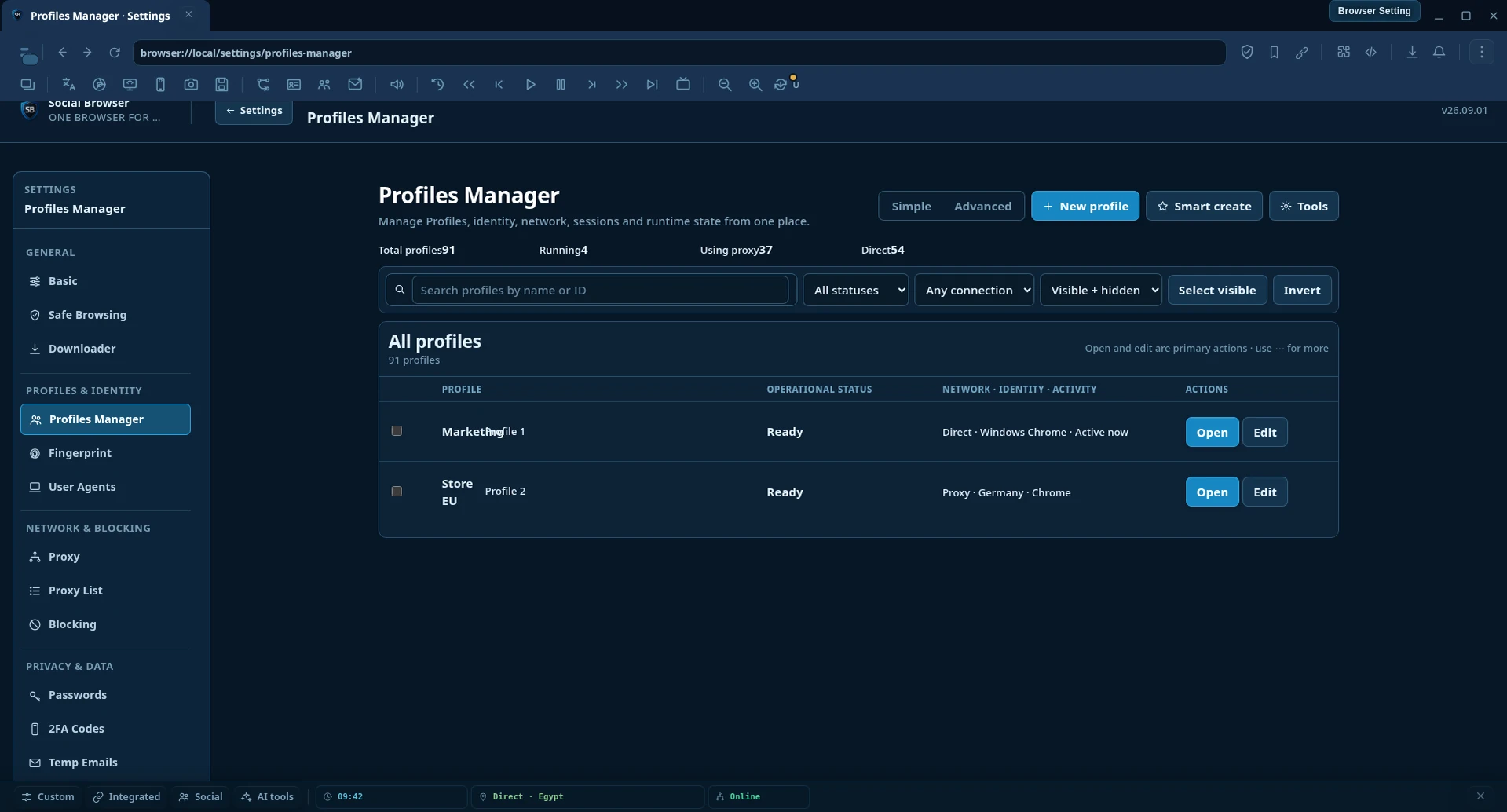
Assign a responsible operator and document the normal task. Avoid sharing one Profile informally among a rotating set of employees: that makes it harder to distinguish errors, account changes, and legitimate activity in an audit. Separation is most useful when operations, ownership, and incident response are also clearly defined.
Profile isolation is not a guarantee against account restrictions. Websites can apply independent checks for login risk, cookies, location changes, device factors, or policy violations. Use Profiles to organize authorized work, not to evade enforcement.
3. Decide whether a proxy is needed, then choose deliberately
Not every Profile needs a proxy. Direct connectivity is often simpler for a team working in its normal approved region. If a legitimate project has a location-specific network requirement, assign that network configuration explicitly to the relevant Profile and document why it is used.
| Requirement | Reasonable network choice | Check before using it |
|---|---|---|
| Ordinary local staff session | Direct connection | Network stability and site requirements |
| Consistent authorized regional workflow | Stable, provider-approved endpoint | Location, session continuity, latency, provider terms |
| Public data collection with permission | Provider endpoint appropriate for the task | Rate limits, collection policy, rotation strategy, consent |
| Location QA or approved geo-testing | Documented region-specific test endpoint | Actual exit geography and reproducibility |
Do not assume a residential address guarantees better results. Regional accuracy, provider reputation, latency, and network behavior all need to be tested in the actual authorized workflow. For sessions requiring continuity, a per-request rotating endpoint may be less appropriate than a stable one.
4. Verify the actual route, not just the configuration label
After assigning a proxy in a Profile, open a trustworthy IP information service in that same Profile, record the displayed public IP and reported region, and compare them with the intended setup. Then check the service's expected pages and login flow. A proxy dropdown showing a particular name does not, by itself, prove that traffic uses that endpoint.
When a connection changes or falls back, repeat the test within the active Profile rather than inferring behavior from a different tab. If a provider exposes an authenticated proxy hostname and port, safeguard its credentials and restrict who can edit them. Troubleshoot failed connections with the provider's documented instructions instead of continually cycling identities or networks.
For reproducible QA, record an internal test ID, the browser Profile ID, requested routing mode, actual exit region, test time, and the observed result. This makes support much easier than relying on an unstructured screenshot or a vague note that a proxy 'worked'.
5. Treat recovery methods and MFA as separate controls
The strongest session separation still cannot rescue an organization that has lost account recovery ownership. Every authorized account should have an agreed MFA method, a controlled recovery channel, a revocation procedure, and a clear escalation contact. Enable supported multi-factor authentication, use unique credentials, and review sessions regularly where the service offers those controls.
If an external account supplier is involved, confirm whether changing the recovery email, MFA configuration, or device associations is permitted, required, and properly documented. Do not follow a vendor procedure that contradicts the service's security rules. In regulated or customer-facing settings, obtain the client's written authorization first.
6. Add a pre-login checklist and a change log
- Confirm lawful ownership or documented permission to operate the account.
- Confirm the correct project code, browser Profile, and authorized operator.
- Review service-specific rules and any known restrictions on location or third-party access.
- Verify the network route in the same active Profile if a proxy is configured.
- Check who controls MFA, recovery email, and emergency revocation.
- Perform only the approved task, then record unexpected prompts or account changes.
Changes worth recording include assigning a new proxy, rotating authorized credentials, onboarding a new employee, changing recovery ownership, or moving an account to a different department. Keep such logs free of secrets. A simple review cadence—weekly for high-impact assets or at every staff handover—can surface problems before they become outages.
7. A realistic three-client example
Consider an agency that manages reporting access for three clients. Each client retains ownership of their accounts and grants scoped access to the agency. The agency creates three Social Browser Profiles, groups them under Client Reporting, and tags each with the appropriate team. Operators use only approved credentials and document any proxy requirement in the corresponding project register.
When a client's login prompts for additional verification, the team contacts the owner rather than trying another unrelated identity or bypassing the control. When an employee leaves, the manager revokes their access at the service level and verifies that shared secrets or sessions have been retired. The browser helps keep workflows separate, but the durable security comes from account ownership and review procedures.
8. How to evaluate account-operation content critically
AccsZone publishes articles about first-login checks, proxy types, and account-operation processes. These can be starting points for questions to ask, not substitutes for your own policy and platform verification. In particular, any recommendation to use certain identity attributes or networks should be assessed against the service's terms and legitimate business need. A profile manager does not make an unauthorized account legitimate.
For teams exploring the editorial partnership, AccsZone also hosts a Social Browser partner listing. That listing is a reciprocal promotional reference, not evidence of a built-in API integration, verified account inventory, or guaranteed results.
Practical takeaway
A sustainable multi-account workflow begins with authorization and accountability, then uses isolated Profiles, deliberate proxy assignments, recovery ownership, and a small test and review log. The outcome is clearer operations and fewer avoidable cross-client mistakes—not immunity from platform rules or technical failures.
Further reading: Social Browser official website · Partner directory · AccsZone first-login checklist.